I Built an AI Course Generator with Gemini & Next.js
Preparing for a technical interview or an upcoming exam usually means choosing between scattered YouTube playlists, expensive SaaS platforms, or generic flashcard apps that don't know your topic. None of them generate a complete, structured curriculum from a single prompt — for free, on your own hardware.
Synapse is my open-source answer to that gap: type in any topic — System Design, Calculus, Docker networking — and it generates a full course with modules, lesson content, and quiz checkpoints in seconds. No subscription. No vendor lock-in. Bring your own Gemini API key, or run it entirely offline with Ollama.
This post goes under the hood: the AI generation pipeline, the offline-first data layer, the dual provider model, and the engineering decisions that make it all work reliably.
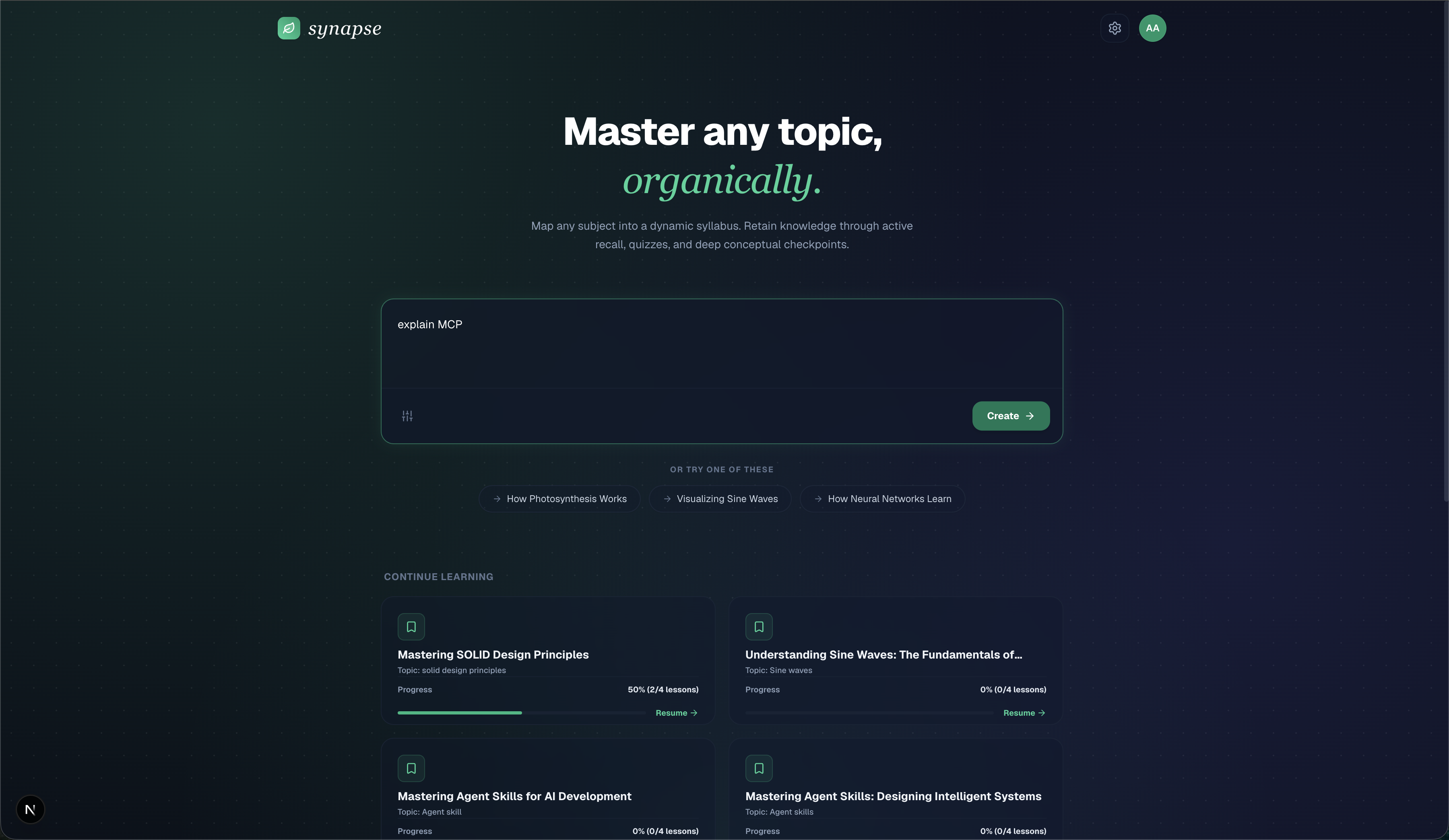
See It in Action
You can explore the full codebase, structure, and configuration details in the Synapse GitHub repository.
What Synapse Does
Give Synapse a topic — Quantum Physics, CSS Grid, Byzantine Fault Tolerance — and it produces:
- A structured syllabus with named modules and individual lessons
- Markdown lesson content for each lesson, rendered with syntax-highlighted code and tables
- Quiz checkpoints at the end of every lesson with four answer choices and a graded explanation
Everything is persisted, resumable, and works offline.

The AI Pipeline: Gemini on the Server
All AI calls go through Next.js Route Handlers — the Gemini API key never touches the browser. The primary generation endpoint is /api/generate, which receives a user topic prompt and uses Gemini to produce a structured CourseDocument.
The prompt engineering here is strict: the model must return valid JSON matching a TypeScript interface, not free-form prose. The response shape is:
interface CourseDocument {
  id: string;
  title: string;
  prompt: string;
  completedLessons: string[];
  createdAt: string;
  syllabus: {
    title: string;
    description: string;
    modules: Array<{
      id: string;
      title: string;
      lessons: Array<{
        id: string;
        title: string;
        concept: string;
        content: string;       // Full markdown lesson body
        componentType: 'quiz';
        quizData: {
          question: string;
          options: string[];   // Exactly 4 choices
          correctIndex: number;
          explanation: string;
        }
      }>;
    }>;
  };
}
The LLM is responsible for generating content at every level of this tree simultaneously — topic, module hierarchy, lesson prose, and quiz logic — in a single structured generation pass. This is significantly harder to prompt reliably than asking for prose, but it means the app receives a fully consistent course object without chained calls.
Retry with Exponential Backoff
Gemini at scale will occasionally rate-limit (429) or time out. Wrapping every API call in a bare fetch and hoping for the best is not a production strategy. Every call inside /api/generate runs through a retry handler with exponential backoff:
async function withRetry<T>(
  fn: () => Promise<T>,
  maxRetries = 3,
  baseDelayMs = 1000
): Promise<T> {
  let lastError: unknown;
  for (let attempt = 0; attempt <= maxRetries; attempt++) {
    try {
      return await fn();
    } catch (err: unknown) {
      lastError = err;
      const status =
        err instanceof Error && 'status' in err
          ? (err as { status: number }).status
          : null;
      // Retry on rate limit, overload, or network dropout
      if (
        attempt < maxRetries &&
        (status === 429 || status === 503 || !status)
      ) {
        const delay = baseDelayMs * Math.pow(2, attempt);
        await new Promise((res) => setTimeout(res, delay));
        continue;
      }
      throw err;
    }
  }
  throw lastError;
}
This gives the API three attempts with delays of 1 s, 2 s, and 4 s before surfacing the error to the user — covering the vast majority of transient failures without burning through the retry budget on genuinely broken requests.
Dual Provider: Cloud and Local Inference
Synapse supports two model backends. You can switch between them at any time from the Model Configuration panel in the sidebar — no server restart required.
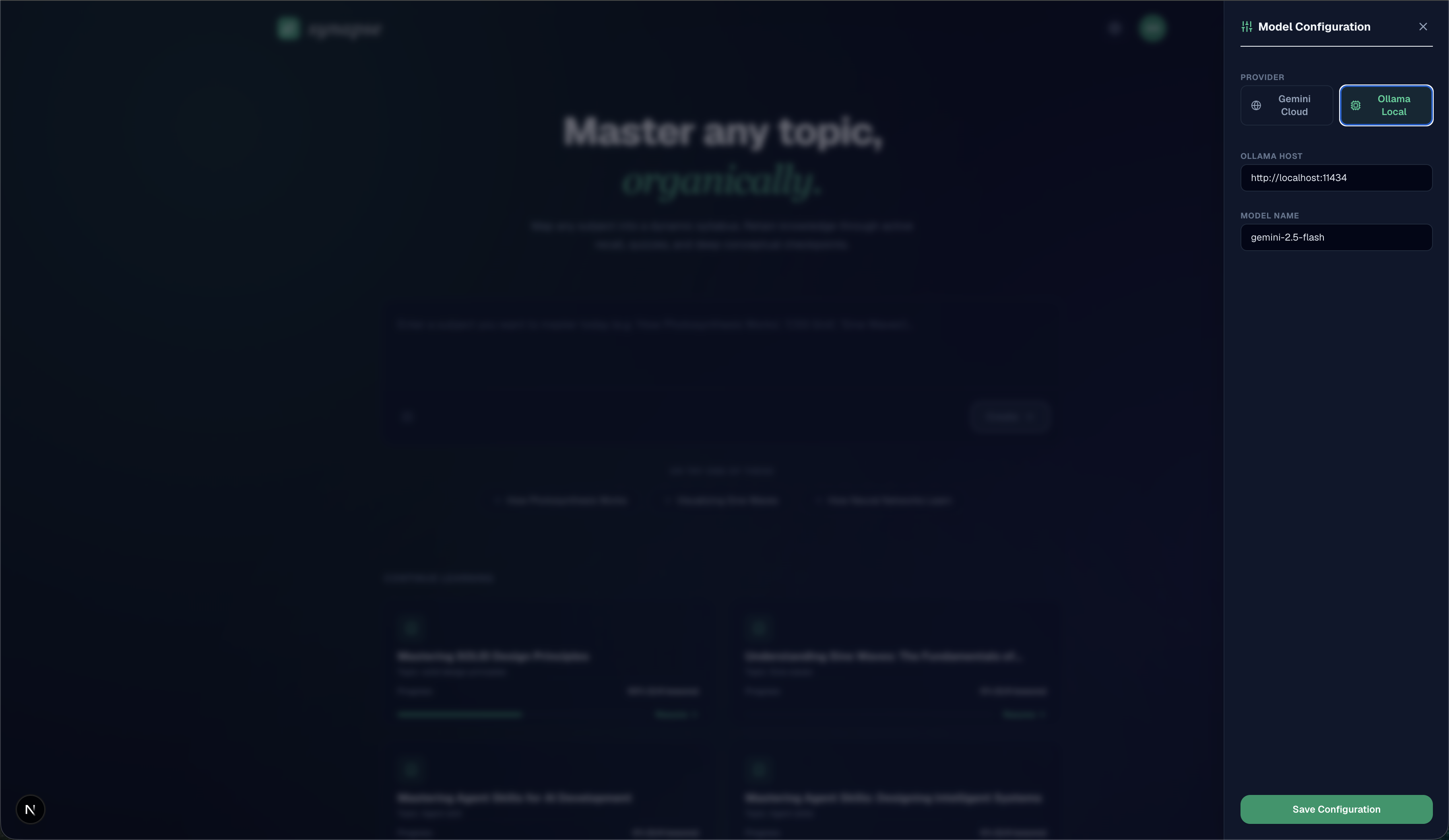
Google Gemini (Cloud) — the default. Enter your GEMINI_API_KEY directly in the UI, or set it in .env as a server-side default. Produces the best output quality and handles long structured generation reliably.
Ollama (Local) — for fully offline use or when you want to keep data on-device. Enter your Ollama daemon URL (e.g., http://localhost:11434) and model tag (e.g., gemma4:e4b) in the UI, or pre-configure them via OLLAMA_HOST / OLLAMA_MODEL in .env. The generation prompt and JSON schema are identical — only the API client changes.
The UI-saved configuration is persisted to MongoDB under a user_settings document and loaded on next visit, so users who set their key once don't need to re-enter it.
Offline-First Data Architecture
The most underappreciated part of Synapse is its data layer. A naive implementation would hit MongoDB on every page load and break entirely when the connection drops. Synapse treats offline as a first-class state, not an error condition.
The Two-Layer Cache
| Layer | Technology | What It Stores |
|---|---|---|
| Cloud primary | MongoDB Atlas | Full course history for all sessions |
| Local fallback | IndexedDB (synapse_db) | Complete Course objects, keyed by course id |
| Config | localStorage | Active course ID, model config, migration flags |
IndexedDB is chosen over localStorage for course history because:
- No 5 MB quota — a full course with multiple modules and lesson content easily exceeds localStorage limits
- Non-blocking — asynchronous reads/writes do not block the main thread during rendering
- Structured access — the
course_historyobject store can be queried by key without parsing JSON strings
Automatic Sync on Reconnect
The sync algorithm runs on homepage mount:
1. Fetch course history from MongoDB (online path)
2. Load all cached courses from IndexedDB (local path)
3. For each local course not present in MongoDB,
   OR with higher lesson completion count than MongoDB:
     → Add to sync queue
4. Bulk POST the sync queue to /api/courses
5. Overwrite IndexedDB with the unified ground-truth from MongoDB
This handles two scenarios automatically: courses created while offline, and lesson completions recorded locally that have not yet reached the server. The user never needs to manually trigger a sync or lose progress.
Markdown Rendering: Lessons as Living Documents
Lesson content is stored as raw Markdown in CourseDocument.syllabus.modules[].lessons[].content and rendered in the workspace using react-markdown with remark-gfm.
This means lessons can contain:
- Fenced code blocks with language syntax highlighting
- GFM tables for comparison content
- Tasklists and strikethroughs
The Markdown is generated by the LLM, which means the model must produce syntactically valid GFM as part of the structured JSON response. Getting this right consistently required tight system prompting: the model is explicitly instructed to use fenced code blocks with language tags, avoid HTML in lesson bodies, and keep line widths under 80 characters for code samples.
The Workspace: Interactive Learning Tools
Beyond the lesson viewer, the workspace includes several integrated learning tools:
Course Sidebar — lists all modules and lessons with visual completion indicators. Clicking a lesson loads it instantly from the already-fetched course object without a network round-trip.
Quiz Card — embedded at the end of every lesson. Four answer choices, immediate feedback, and a graded explanation on submission. Correct answers mark the lesson as complete in both IndexedDB and MongoDB.
What I Would Do Differently
Streaming generation — the current architecture generates the full course document in one request and displays it on completion. For longer courses, this creates noticeable latency. A streaming approach using Gemini's streaming API would allow displaying modules as they are generated, dramatically improving perceived performance.
Separate lesson generation — generating all lesson content upfront in a single prompt produces uneven quality: some lessons are detailed, others thin. Generating the syllabus structure first, then generating each lesson independently in parallel, would both improve quality and enable streaming.
User authentication — course history is currently tied to a single local-user MongoDB document. Supporting multiple users requires an auth layer. The IndexedDB and MongoDB schemas are designed for it — the id field can be scoped per user without structural changes.
Key Takeaways
- Server-side AI calls are non-negotiable: API keys must never be exposed to the browser
- Exponential backoff on AI API calls prevents transient rate limits from surfacing as user-visible errors
- IndexedDB over localStorage for any structured data approaching or exceeding 1 MB — the non-blocking async API is worth the slightly more complex access pattern
- Offline sync on reconnect is a small amount of code with an outsized impact on perceived reliability
- Structured JSON generation from LLMs requires tight system prompting and a schema the model can follow consistently — treat the prompt like a TypeScript interface definition
- Dual provider support from day one keeps the app useful without an internet connection and lets users keep sensitive content on-device